

55BMW Deposit Guide 2026
55BMW Deposit: How to Deposit via GCash & Maya
Learn how to deposit money into your 55BMW account safely using GCash and Maya. This guide covers the step-by-step process, important checks, and common issues.
App Information
What Is 55BMW Deposit?
Deposit is the process of transferring money from your GCash or Maya wallet into your 55BMW account so you can play games. Before making any deposit, always confirm the following:
- You are logged in on the official verified website or app
- The payment method (GCash / Maya) is currently available
- You understand the minimum and maximum deposit limits
- You have checked any fees or processing time shown on the page
How to Deposit on 55BMW
Choose your preferred payment method below.
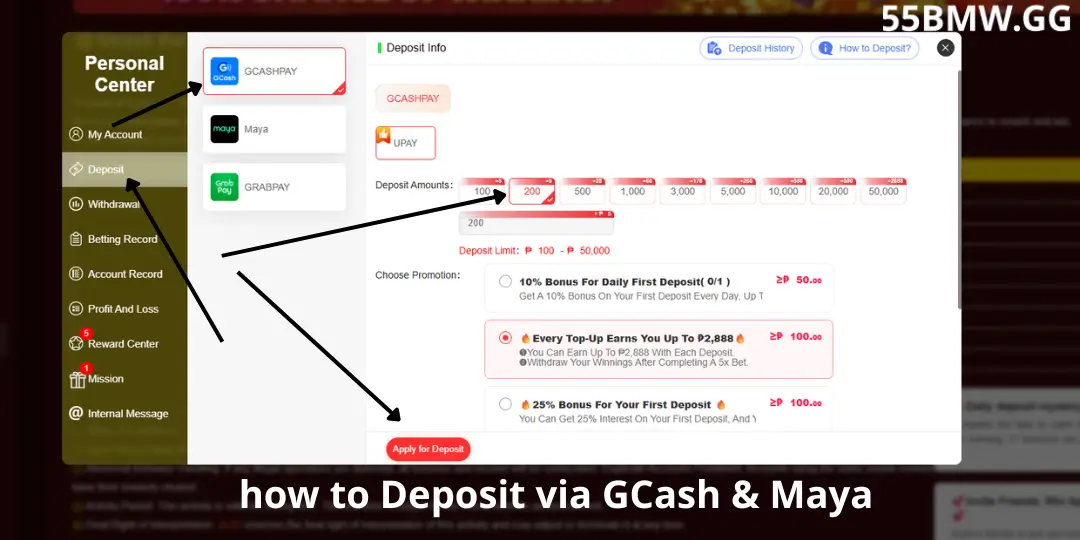
Deposit via GCash – Step by Step
Open the official website or app and sign in with your username and password.
Look for the Deposit, Wallet, or Cashier button, usually located in the menu or account area.
Choose GCash from the list of available payment options.
Type the amount you want to deposit (check the minimum and maximum limits shown on the page).
Carefully review the amount, any fees, and the payment destination shown by the system.
Follow the on-screen instructions. You may be redirected to the GCash app or asked to scan a QR code / enter a reference number.
After successful payment, return to 55BMW and check your account balance. Keep the transaction reference for your records.
Deposit via Maya – Step by Step
Open the official website or app and sign in with your username and password.
Find the Deposit, Wallet, or Cashier option in the menu.
Choose Maya from the available payment options.
Input the amount you wish to deposit and check the limits displayed.
Review the amount, fees (if any), and the payment destination carefully.
Follow the instructions. You may need to open the Maya app, scan a QR code, or confirm the transaction.
After payment is successful, check your 55BMW balance. Save the transaction reference.
Important Checks Before You Deposit
- Make sure you are on the official verified website or app
- Confirm the deposit amount and any displayed fees
- Check that the payment destination matches the official instructions
- Keep the transaction reference and screenshot (hide sensitive info)
- Do not send a second payment until the first one is confirmed
- Never share your GCash/Maya PIN or OTP with anyone
Common Deposit Problems and Solutions
| Common Issue | How to Fix It |
|---|---|
| Deposit not reflecting in account | Wait a few minutes, check transaction status in GCash/Maya, then contact official support with the reference number. |
| Payment failed or cancelled | Check your GCash/Maya balance and try again. Do not repeat the payment if the first one is still pending. |
| Wrong amount deposited | Contact official support immediately with the transaction details. |
| QR code not working | Refresh the deposit page and generate a new QR code. |
| Asked to send money to a personal account | Stop immediately. This is not an official process. Only follow instructions inside the official deposit page. |
Conclusion
Depositing via GCash or Maya on 55BMW is straightforward when you follow the official process. Always log in through the verified website or app, select the correct payment method, enter the amount carefully, and complete the payment only through the instructions shown on the platform.
Keep your transaction records and never send money to personal accounts shared outside the official system.