
55BMW Register: How to Register a 55BMW Account Step by Step
Creating an account is the first step for users who want to explore and access the 55BMW platform. This guide explains the information required, how to create a password, and how to complete the basic verification steps.
What Is 55BMW Register?
55BMW Register refers to the account registration feature on the 55BMW platform. It allows users to create their login credentials by setting a member account name and password, confirming their password, providing their full name, and entering a CAPTCHA verification code when required.
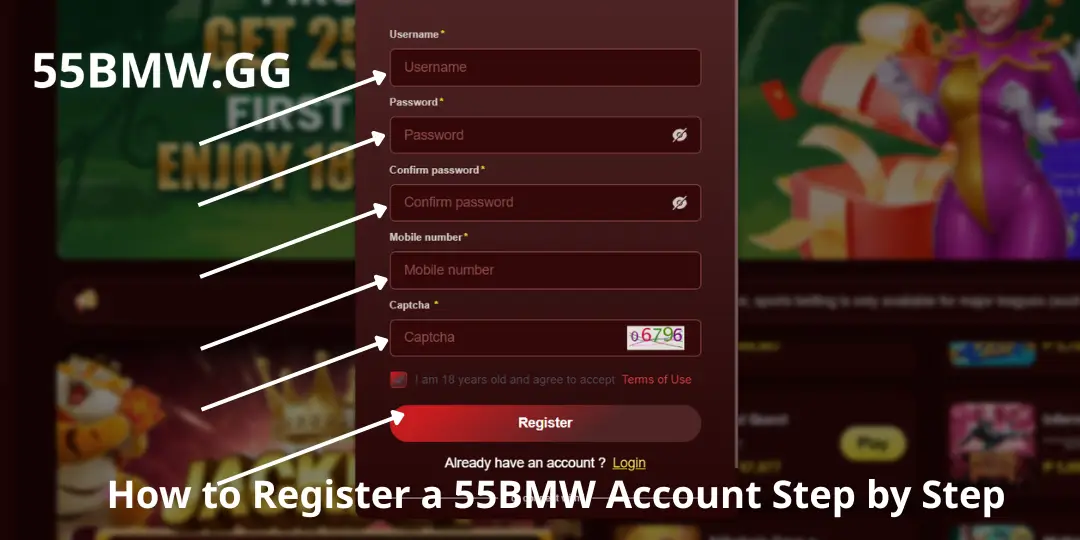
The registration form contains five main fields:
- Member Account – Your account username
- Password – The password used to access your account
- Confirm Password – Confirm your password
- Full Name – The registrant’s complete name
- Captcha – Verification code to distinguish real users from bots
Understanding each field before completing the form can help reduce mistakes and prevent potential issues when logging in or verifying your account later.
How to Register a 55BMW Account Step by Step
Follow the steps below carefully. Always use the official verified website.
Step 1: Visit the 55BMW Registration Page
Open the official 55BMW website that you have independently verified. Look for the Register, Sign Up, or Registration option. Check the website address carefully before entering any personal information.
Step 2: Enter Your Member Account
Create your username. It should contain between 2 and 15 characters, begin with a letter, and use only characters accepted by the form. Choose a username that is easy to remember but does not reveal sensitive information.
Step 3: Create Your Password
The password must contain at least six characters and include both letters and numbers. For better security, use a longer password with uppercase, lowercase, numbers and special characters if supported. Avoid reusing passwords from email or banking accounts.
Step 4: Confirm Your Password
Enter the exact same password again. Both fields must match completely, including uppercase and lowercase letters.
Step 5: Enter Your Full Name
Use your complete and accurate name. It should match the information used for bank account withdrawals and identity verification. Avoid nicknames or false details.
Step 6: Enter the CAPTCHA Code
Carefully type the verification code shown on the page. If the image is unclear, refresh it and try again.
Step 7: Review and Submit
Double-check all fields, then click the Register / Submit button. Wait for the system confirmation. Do not submit the form repeatedly if an error appears.
Common 55BMW Registration Problems and Solutions
| Common Issue | How to Fix It |
|---|---|
| Invalid username | Check the required length, first character, and permitted characters. |
| Username already exists | Choose another username that follows the registration rules. |
| Password does not meet requirements | Check the minimum length and make sure it contains both letters and numbers. |
| Password confirmation does not match | Re-enter the exact same password in both fields. |
| Invalid full name | Use your accurate name as required for verification. |
| Incorrect CAPTCHA | Refresh the code if possible and enter it carefully. |
| Unable to submit the form | Check your internet connection, required fields, and any displayed error messages. |
Important Tips When Creating a 55BMW Account
- Verify the website address – Only enter information on a site you have independently checked.
- Protect your login details – Never share your password or reuse it across multiple services.
- Provide accurate information – Your full name may need to match payment records.
- Read the terms and conditions – Understand privacy policy and verification procedures.
- Keep verification codes private – Never disclose OTPs to other people.
- Follow local laws – Check applicable laws, licensing and minimum age requirements in your location.
Conclusion
55BMW Register is the starting point for creating an account on the 55BMW platform. Users need to complete five main fields: Member Account, Password, Confirm Password, Full Name, and Captcha. After reviewing the information, submit the form according to the website’s instructions.
To make the process smoother, follow the username requirements, create a strong password, provide accurate personal information, and enter the CAPTCHA carefully. Most importantly, verify the website’s authenticity and review its terms and conditions before submitting any personal details.